How to Use Shiny Marker in Your Workflow for Creative and Professional Projects
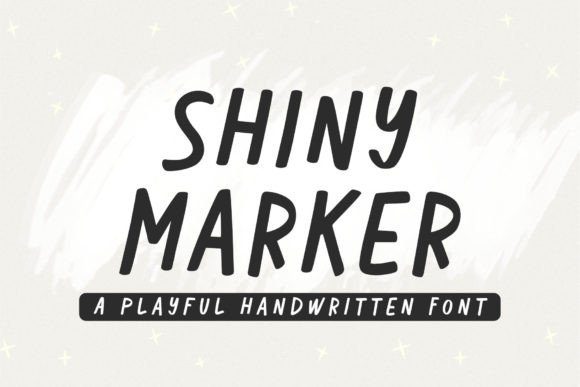
Shiny Marker is a playful, stylized marker font that brings a touch of whimsy and warmth to your digital and print projects. Its hand-drawn appearance mimics the look of a highlighter or bold marker stroke, making it ideal for emphasizing key points, adding visual interest, or creating a friendly tone in various contexts. Whether you're designing greeting cards, branding materials, or even educational content, integrating Shiny Marker into your workflow can enhance readability and engagement without overwhelming the overall design.
Understanding Where Shiny Marker Fits In
Fonts like Shiny Marker are more than just aesthetic choices—they serve functional roles in communication. They help guide attention, evoke emotion, and create visual hierarchy. In this case, Shiny Marker works best when used sparingly as an accent rather than for body text. It shines (pun intended) in situations where you want to draw the eye to specific elements: quotes, headings, call-to-action buttons, or handwritten-style notes.
Its versatility makes it a valuable tool during different stages of a project. Before beginning a creative task, consider how Shiny Marker might complement your message. During the design process, use it to add flair while maintaining clarity. After finalizing content, it can be part of a review checklist to ensure consistency and effectiveness in visual storytelling.
Use Cases for Shiny Marker Across Industries
Here are some practical scenarios where Shiny Marker adds value:
- Marketing and Branding: Highlight key phrases in promotional materials, social media posts, or product packaging to make them pop visually.
- Education and Presentations: Add emphasis to important concepts in slides, worksheets, or learning modules without using traditional formatting tools like bold or underlining.
- Content Creation: Use it in blog headers, video thumbnails, or infographics to inject personality into your work.
- Greeting Cards and Invitations: Create a personal, handwritten feel with consistent typographic style across multiple designs.
- Productivity Tools: Apply it in templates for to-do lists, planners, or project timelines to differentiate tasks or milestones.
In each of these cases, the font’s charm lies in its ability to blend creativity with professionalism. It's not just about looking good—it's about enhancing the user experience through thoughtful typography.
Preparing to Use Shiny Marker Effectively
Before incorporating Shiny Marker into your work, take a moment to plan its role in your design. Consider the following steps to prepare:
- Determine the purpose: Will it be used for headlines, bullet points, or decorative accents? Knowing this will guide how much or how little you apply it.
- Check compatibility: Ensure the font is supported by your design software or platform. Most modern tools like Adobe Photoshop, Illustrator, Canva, or Google Docs should accept it easily after installation.
- Pair it wisely: Because of its bold, playful nature, pair Shiny Marker with a clean, neutral sans-serif or serif font to maintain balance and legibility.
- Test in context: Try out the font on sample layouts to see how it looks at different sizes and weights. This helps avoid issues when scaling for print or web use.
Proper preparation ensures that Shiny Marker contributes positively to your design rather than detracting from it. A well-thought-out typographic strategy can streamline your workflow and reduce rework later on.
Integrating Shiny Marker Into Design Workflows
When working on a brand identity project, for example, you might start by outlining the core messaging and color palette. Once the foundation is set, introduce Shiny Marker to highlight taglines or slogans. This allows you to test how it aligns with your brand voice—playful, youthful, or simply standout.
For educators, integrating Shiny Marker into lesson plans can make learning materials more engaging. Use it to outline key takeaways in student guides or to emphasize vocabulary in language-learning apps. The contrast between the bold strokes and standard text can aid retention and make study sessions more interactive.
Freelancers and entrepreneurs often rely on quick turnaround times. Adding Shiny Marker to their design toolkit means they can create eye-catching visuals faster, especially when using pre-made templates. For instance, a freelancer could generate a series of social media posts with consistent branding by applying Shiny Marker to all highlighted text across the campaign.
Practical Tips for Implementation
To get the most out of Shiny Marker, keep these tips in mind:
- Limit usage: Apply it only to short phrases or words to preserve readability. Long paragraphs in this font may become difficult to read.
- Use contrasting colors: Since the font has a high-contrast appearance, pairing it with complementary or muted tones can prevent visual clutter.
- Maintain consistency: If you decide to use Shiny Marker in multiple documents or platforms, define a clear style guide to ensure it’s applied uniformly.
- Consider accessibility: While it adds visual appeal, ensure that the text remains legible for users with visual impairments. Avoid overusing effects like shadows or outlines unless necessary.
- Export carefully: When preparing files for print or web, verify that the font embeds correctly. Some platforms require you to convert text to outlines before exporting to guarantee the style displays properly across devices.
These guidelines help maintain a professional finish while still leveraging the unique character of Shiny Marker. It's all about finding the right balance between form and function.
Workflow Examples Using Shiny Marker
Let’s explore a few real-world workflows where Shiny Marker plays a useful role:
Example 1: Creating a Product Launch Poster
During the early planning phase of a product launch poster, the designer selects a bold headline that captures attention. They install Shiny Marker and test it against several alternatives. Once chosen, it becomes the primary font for the title and secondary highlights such as pricing and features. The team then reviews the poster for alignment and contrast, ensuring that the playful style doesn’t clash with the clean layout below.
Example 2: Designing a Social Media Template Pack
A blogger needs to create a set of Instagram stories and Facebook banners. They download Shiny Marker and integrate it into their Canva template library. Each post uses the font for the main hook or quote, paired with a minimalist sans-serif for supporting text. After producing the assets, they conduct a usability test with followers to gauge if the font enhances the message or distracts from it.
Example 3: Enhancing a Classroom Resource
An educator wants to improve student engagement in a science module. They incorporate Shiny Marker into flashcards and infographic-style handouts to emphasize scientific terms and definitions. By doing so, they make complex topics more approachable and memorable. The teacher also shares the resources digitally, ensuring the font renders correctly across devices students might use.
Long-Term Use and Quality Control
Using Shiny Marker consistently across projects requires attention to quality control and organization. Here’s how to manage it effectively:
- Font library management: Keep track of where you’ve used the font and what variations exist. Cloud-based font libraries or local folders can help streamline access.
- Version tracking: If you update your brand assets or templates, note when and where Shiny Marker was last used to ensure continuity.
- Backup fonts: Always have a backup font ready in case Shiny Marker isn't available due to licensing or technical issues. This avoids delays in production.
- Feedback loops: Incorporate user feedback to assess whether the font is effective in its current application. Adjust based on responses to optimize impact.
Over time, developing a system around your font choices will improve efficiency and reduce errors. Shiny Marker, when managed thoughtfully, can become a trusted element in your creative process.
Interactions With Other Tools and Resources
Shiny Marker works seamlessly with many design tools and platforms. Below are some common integrations:
- Adobe Creative Suite: Import the font into Photoshop or Illustrator for high-quality graphic design. These programs allow for fine-tuning spacing and layering to match your design intent.
- Canva: Upload Shiny Marker directly to your Canva account for easy access when creating marketing collateral or social media graphics.
- Google Slides / Docs: Ideal for presentations or reports that need a creative edge. Just install the font on your device and select it within the app.
- Print Services: Confirm with your printer or online service that they support custom fonts. Some platforms may require you to convert text to outlines or vector shapes.
- Web Development: Embed Shiny Marker using @font-face in CSS. However, always consider fallback fonts and performance implications when using external web fonts.
By understanding how it interacts with other tools, you can maximize its potential without compromising your workflow speed or output quality.
Conclusion
Shiny Marker is a versatile addition to any creative or professional toolkit. Its unique style offers a way to stand out while still delivering clarity and purpose. Whether you're crafting stellar quotes, designing greeting cards, or building brand materials, this font can elevate your message with minimal effort. By integrating it thoughtfully into your planning and execution processes, you ensure that every use feels intentional and impactful.
Remember, the best design decisions come from understanding both the tool and the audience. As you continue refining your workflow, Shiny Marker can become a reliable asset in your typographic arsenal—helping you communicate with confidence and creativity.