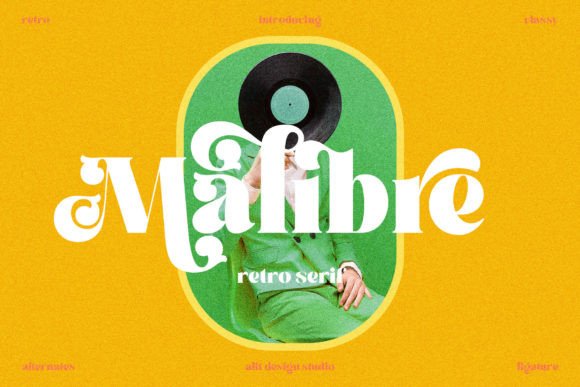
Malibre: A Stylish Display Font for Headlines and Logos
Why Choose Malibre for Your Projects?
- Strong Visual Impact: The bold weight and confident structure of Malibre make it ideal for headlines and large text applications.
- Luxurious Feel: Its refined details give off a high-end vibe, suitable for premium branding and luxury product displays.
- Dynamic and Versatile: Whether you’re going for a vintage look or something more modern, Malibre adapts well to different styles and themes.
- PUA Encoding: This feature ensures easy access to special glyphs and ligatures, streamlining your workflow and allowing for greater creativity.
Applications Across Industries
Marketing and Advertising: In promotional materials like posters, banners, and social media graphics, Malibre helps grab attention and reinforce brand messaging. Its strong presence works well for slogans and taglines that aim to leave a lasting impression.
Web Design: When used for headers or hero sections, Malibre adds a layer of sophistication to websites. It pairs beautifully with minimalist layouts and complements background imagery without overwhelming it.
Logo Creation: As a logotype font, Malibre brings personality and distinction to a brand. It’s especially useful when creating names that need to feel memorable yet elegant.
Print Media: From magazine covers to event invitations, this font enhances the tactile experience of printed content by adding a sense of exclusivity and style.
Educational Materials: Educators and institutions can use Malibre for title pages, certificates, or promotional flyers where a professional yet approachable tone is desired.
Freelance Work: Freelancers and independent creators benefit from using Malibre in portfolios, client proposals, and personal branding projects. It gives their work a polished edge that sets them apart.
Designing with Malibre: Tips and Best Practices
- Pair Wisely: Combine Malibre with a complementary sans-serif or serif body font to maintain readability while highlighting the headline. Think about contrast—bold vs. subtle, decorative vs. clean.
- Use Sparingly: While it's beautiful, overusing Malibre in long blocks of text can reduce legibility. Reserve it for titles, logos, or short impactful phrases.
- Experiment with Ligatures: Thanks to its PUA encoding, you can easily explore alternative characters and ligatures to fine-tune the look of your design.
- Consider Color and Contrast: Use darker tones or metallic shades to enhance the luxurious feel of Malibre. High contrast against light backgrounds often yields the best results.
- Test Across Devices: Always preview how Malibre appears on different screens and in print. Ensure it maintains clarity and consistency in all formats.
Real-World Examples of Malibre in Action
Example 1: Branding for a Vintage Winery
Imagine launching a new line of artisanal wines. Using Malibre for the label and packaging name instantly evokes a sense of timelessness and quality. The font's ornate details match the craftsmanship behind the product, helping to build trust and interest among consumers.
Example 2: Fashion Blog Header
For a fashion blog targeting a mature audience, Malibre can be used in the site header to suggest elegance and confidence. Paired with a soft color palette and high-quality images, it creates a visually appealing and cohesive user experience.
Example 3: Conference Poster Design
When designing a poster for a business conference, Malibre can be used for the main title. Its boldness commands attention, while its refined appearance aligns with the professional nature of the event.
Choosing the Right Tool for the Job
- Is this a headline-driven design?
- Do I want to convey luxury, nostalgia, or both?
- Will the font remain readable in the context of my layout?
- Does it align with the overall brand personality?