Sapiderline: A Unique Display Font That Can Elevate Your Design
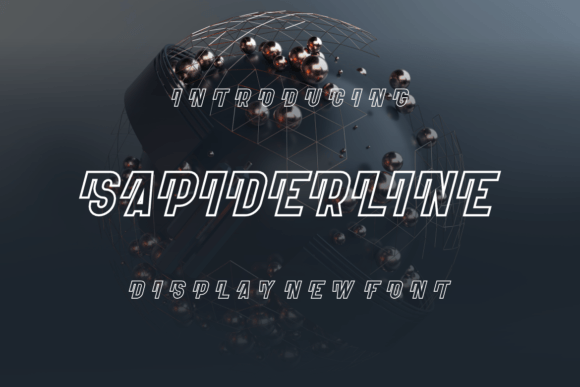
If you're on the lookout for a font that stands out from the crowd and adds personality to your creative projects, Sapiderline is worth considering. This quirky display font is designed with flair and versatility in mind, making it ideal for branding, logos, social media content, or any project where visual impact matters. Its bold character shapes and distinctive style set it apart from more conventional typefaces, offering designers and creators a powerful tool to communicate their message with clarity and charm.
Why Sapiderline Appeals to Designers and Creators
Sapiderline isn't just another pretty font — it's a statement. With its playful yet professional look, it bridges the gap between whimsy and elegance, appealing to both beginners and seasoned professionals. The font is particularly popular among marketers, bloggers, educators, and small business owners who want to create eye-catching headlines or add a touch of uniqueness to presentations, websites, and print materials.
Its high contrast and exaggerated strokes make it especially effective for large-scale use, such as billboards or banners. But this doesn’t mean it’s limited to those applications; when used thoughtfully, it can also enhance smaller text elements like buttons, infographics, or even short quotes on product packaging.
Common Misunderstandings About Sapiderline
Despite its popularity, many users make the mistake of using Sapiderline without fully understanding how it works best. One common error is assuming it's suitable for body text. Because of its intricate details and stylized forms, it reads poorly at smaller sizes or in long paragraphs. It’s a display font, not a sans-serif or serif intended for readability in extended form.
Another misunderstanding is thinking that one size fits all. Some creators apply the same weight or scale across different platforms — say, using it identically for a website header and a mobile app icon. This often leads to poor legibility or an unbalanced visual hierarchy. Understanding how Sapiderline behaves at various sizes and weights is key to leveraging its full potential.
Mistakes to Avoid When Choosing and Using Sapiderline
Here are some practical mistakes people often make when choosing or applying Sapiderline, along with how to avoid them:
- Using it in inappropriate contexts: As mentioned, Sapiderline is not ideal for dense reading material. Applying it to menus, books, or articles will likely reduce readability and frustrate users.
- Ignoring color contrast: The font’s ornate design requires careful consideration of background and foreground colors. If the contrast is too low, the characters may become difficult to read, especially in digital formats.
- Overusing ligatures or special characters: While these features can add flair, they aren’t always necessary. Too many can clutter the design and distract from the main message.
- Not checking licensing before use: Many fonts come with specific usage rights. Before downloading or buying Sapiderline, ensure the license covers your intended application, whether it's personal, commercial, or web-based.
How These Mistakes Affect Results
Using a font incorrectly can have subtle but significant consequences. For instance, if you use Sapiderline for body copy in a blog post, readers might find it hard to follow, leading to lower engagement and bounce rates. Similarly, if you don’t adjust the font size for mobile displays, your call-to-action button could appear tiny and uninviting.
Color contrast issues can cause accessibility problems, especially for users with visual impairments. And if you unknowingly violate licensing terms, you risk legal complications that could be costly and damaging to your brand reputation.
Practical Advice for Better Use of Sapiderline
To get the most out of Sapiderline, start by defining its role in your design. Is it for a headline, a logo, or a decorative element? Once you know the purpose, consider the following tips:
- Pair it with a simple font: To maintain balance, pair Sapiderline with a clean, minimalist typeface for body text. This helps guide the reader's eye and prevents cognitive overload.
- Test at multiple sizes: Always test the font at the sizes it will appear in real-world use. A font that looks great on your desktop might struggle to hold up on a smartphone screen.
- Use bold sparingly: The bolder weights can be overwhelming if overused. Save them for key messages or brand names where emphasis is needed.
- Consider spacing and kerning: Display fonts often require manual adjustments to letter spacing. Take time to tweak these settings for a polished look.
For example, if you're designing a poster for a music festival, you might use Sapiderline for the event title while pairing it with a sans-serif like Helvetica or Arial for the supporting information. This combination allows the title to pop while keeping the rest of the content easy to scan.
Real-World Applications and Examples
Let’s take a look at a few scenarios where Sapiderline shines — and where it should be avoided:
- Logo design: A local bakery named “Sweet & Crumb” uses Sapiderline in their logo. The result is a warm, inviting look that feels handcrafted and memorable.
- Event signage: At a children's birthday party theme park, Sapiderline is used for directional signs and promotional banners. Its fun and dynamic appearance aligns perfectly with the target audience.
- Infographic titles: Marketers use Sapiderline to draw attention to key data points or headings in visually rich infographics. The contrast helps important stats stand out.
- Website body text (mistake): A fashion blogger once used Sapiderline throughout her site’s blog posts. The text was illegible on screens, causing a drop in user retention and SEO performance due to increased bounce rates.
Before You Download or Buy Sapiderline
It’s tempting to jump straight into purchasing a font that looks exciting. However, taking a few moments to evaluate your needs can save you time and money later. Here’s what to check before committing:
- Is it compatible with your design tools? Make sure Sapiderline works seamlessly with Adobe Illustrator, Photoshop, or Figma, depending on your workflow.
- Do you need web version support? If you’re using it online, confirm that the font includes WOFF or TTF files for web embedding.
- What about multilingual support? If your project involves languages other than English, verify that the font supports the necessary glyphs and diacritics.
- Check for system compatibility: Some fonts render differently across operating systems or browsers. Test it early to avoid last-minute surprises.
Alternative Uses and Creative Workarounds
When Sapiderline doesn’t fit the traditional roles of a display font, consider using it creatively. For instance, you could incorporate it into a pattern or background graphic instead of relying on it for direct messaging. Or use it for accents, like highlighting keywords in a presentation slide.
Another idea is to blend it with other display fonts in a typographic collage. Just be mindful of maintaining harmony and avoiding visual chaos. Sometimes, less is more — especially when working with highly stylized typefaces like Sapiderline.
Final Thoughts on Selecting and Using Sapiderline
In the world of typography, context is everything. Sapiderline is a standout font with the power to transform a design, but only when applied correctly. By understanding its strengths and limitations, you’ll be able to make informed choices that enhance your project rather than hinder it.
Remember, the goal is to communicate effectively while making a visual impression. Whether you're a freelancer, entrepreneur, or hobbyist designer, using Sapiderline wisely can help you achieve both. So next time you're tempted to go bold with your type, ask yourself: does this font serve the message, or is it just there for show?
With the right approach, Sapiderline can be the perfect addition to your design toolkit — helping you create work that’s both beautiful and functional.