Balepo: The Display Font That Elevates Your Design
Fonts are more than just letters—they’re the silent communicators of your brand’s personality, the visual anchor of your creative projects. When it comes to making a bold impression, choosing the right display font is essential. Balepo stands out in this category as an incredibly unique and versatile typeface that can transform any design from ordinary to extraordinary. Whether you're crafting a logo, designing a website, or preparing marketing materials, Balepo offers a distinctive style that helps your message resonate with clarity and flair.
What Makes Balepo Special?
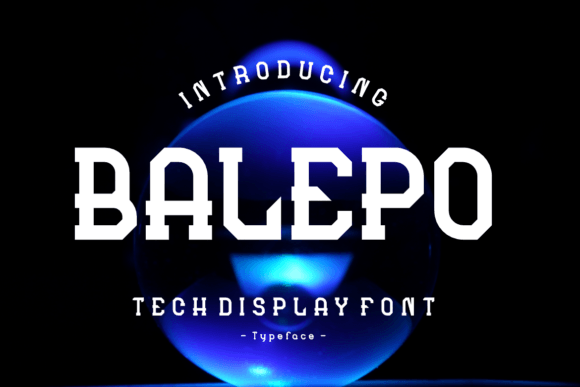
Balepo is not your typical sans-serif or serif font. It’s a meticulously crafted display font that blends artistic expression with readability. Its stylized characters and dynamic curves give it a modern yet timeless feel, while its attention to detail ensures that it works well across various applications—digital screens, print media, signage, and more. This balance between creativity and functionality makes Balepo a favorite among designers who want their work to stand out without sacrificing legibility.
Why People Choose Balepo
- Uniqueness: Balepo avoids clichés and delivers a fresh look that captures attention.
- Flexibility: Designed for a range of sizes and uses, it adapts well to both headlines and subheadings.
- Brand Alignment: Its aesthetic supports a wide variety of industries—from fashion and tech to entertainment and lifestyle.
- High-Quality Construction: With clean lines and balanced spacing, it maintains professionalism even at large scales.
Common Mistakes When Choosing and Using Balepo
While Balepo is a powerful tool, many users make avoidable mistakes when selecting or applying it. These errors can impact the effectiveness of their designs and reduce the overall appeal of the content they create.
1. Overlooking Readability in Small Sizes
Display fonts like Balepo are often optimized for larger text. Some users assume it will perform equally well in body copy or small labels. However, due to its decorative nature, using Balepo in small sizes can lead to poor readability. For example, imagine trying to read product descriptions on a website where the font size is too tiny. Visitors may become frustrated and leave before engaging further.
Better Approach: Reserve Balepo for headlines, titles, and other prominent text elements. For body copy, pair it with a complementary sans-serif or serif font that prioritizes legibility.2. Ignoring Context and Brand Tone
Another common pitfall is using Balepo without considering how it aligns with the project’s overall tone and brand identity. While the font is stylish, it might clash with more conservative or traditional aesthetics. If you're designing a financial report or a legal document, for instance, Balepo could come off as unprofessional or distracting.
Better Approach: Before finalizing Balepo for your project, ask yourself: does this font reflect the message I’m trying to convey? Does it match the brand voice? If not, consider alternatives that better suit the context.3. Using Too Many Variants Without a Strategy
Many display fonts come with multiple weights and styles. Balepo is no exception. But using all these variations haphazardly can result in a disjointed visual experience. A recent case involved a blogger who used three different Balepo variants within a single post, leading to inconsistency and confusion in the reader's mind.
Better Approach: Stick to one or two styles of Balepo per project. Use them intentionally—for example, one weight for headings and another for pull quotes—to maintain harmony and guide the viewer’s eye smoothly through the content.How to Avoid Costly Errors When Evaluating Balepo
Evaluating a font like Balepo involves more than just liking its appearance. Understanding licensing terms, compatibility, and technical performance is crucial to ensuring long-term satisfaction and avoiding unexpected costs or limitations.
Licensing Misunderstandings
A surprising number of users don’t fully understand the licensing agreement when downloading or purchasing Balepo. Some mistakenly believe that a free version allows commercial use, which isn’t always the case. Others might use it across multiple platforms without checking if the license covers web, app, or print usage.
Better Practice: Always review the font’s license agreement before deployment. Look for clauses about permitted uses, redistribution rights, and whether it’s suitable for your specific needs. Consider investing in a premium version if you plan to use it extensively in professional settings.Compatibility and Performance
Even the most beautiful font can fall flat if it doesn’t render correctly across devices and browsers. Some users apply Balepo without testing it on mobile, tablet, and desktop environments. As a result, certain characters may appear distorted or load slowly, especially if the font includes special glyphs or ligatures.
Better Practice: Test Balepo thoroughly on all target platforms. Ensure it loads efficiently by using font subsets or optimizing file sizes. Tools like Google Fonts or Adobe Fonts can help manage performance issues if you're sourcing it online.Proper Application: Where Balepo Shines
Balepo is particularly effective in scenarios where visual impact matters most. Here are some examples of ideal use cases:
- Logo Design: Its bold and expressive character set can serve as the foundation for a memorable brand identity.
- Event Posters: The dramatic curves and structure of Balepo make it perfect for eye-catching event titles.
- Product Packaging: Balepo adds a touch of sophistication and modernity to packaging designs, especially in creative or luxury niches.
- Website Headers: As a header font, Balepo enhances user experience by drawing attention to key sections without overwhelming the layout.
However, improper application can lead to wasted effort and miscommunication. One marketer once used Balepo for all text on a landing page, including body copy, only to receive feedback that the site felt cluttered and hard to navigate. By limiting its use to headers and pairing it with a simpler base font, the designer was able to restore clarity and improve conversion rates.
Key Checks Before Committing to Balepo
To ensure Balepo meets your needs and expectations, take a moment to evaluate the following factors before committing:
- Check Licensing: Confirm whether it’s appropriate for your intended use (commercial, personal, digital, etc.).
- Review Character Sets: Make sure it includes the symbols, accents, and special characters you need.
- Test Across Devices: Verify how it looks and performs on different platforms and screen resolutions.
- Consider Pairing Options: Think about what fonts will complement Balepo in your design system.
- Assess Load Times: Especially important for websites—slow-loading fonts can hurt user experience and SEO rankings.
Learning to Use Balepo Effectively
If you’re new to working with display fonts, Balepo can be a great learning opportunity. Start by experimenting with simple layouts and gradually introduce it into more complex designs. Pay attention to how it interacts with colors, backgrounds, and white space. A strong contrast will usually highlight its features best.
One beginner graphic designer initially struggled with making Balepo look cohesive in her portfolio. After adjusting the background color and adding subtle shadows, she achieved a more polished and professional look. Small tweaks like these can significantly enhance how the font is perceived.
Best Practices for Learning Balepo
- Use tools like Canva or Figma to test Balepo in real-world mockups.
- Watch tutorials on typography pairing and font layering techniques.
- Study how professionals have applied similar display fonts in their work for inspiration.
Final Thoughts on Making the Right Choice
Choosing Balepo can be a game-changer for your creative projects, but it requires thoughtful consideration. By understanding its strengths and limitations, you’ll be able to harness its potential effectively. Avoid the temptation to overuse it or ignore technical details. Instead, treat it as a strategic element in your design toolkit.
Before making the switch to Balepo, ask yourself whether it truly enhances your message and aligns with your goals. When used correctly, it can elevate your branding, boost engagement, and communicate confidence and creativity. But remember—like any tool, its value depends on how well you know how to wield it.